Connecting your site
Connecting your site is one free plugin and one approval. You install the MemberPress AI plugin, click Connect, and approve once on MemberPress.ai. No licence keys. The plugin needs MemberPress (free or paid) on the site.
Watch Opal check a connection
Check your connected site, content author and first answer against Reports.
The connect flow, step by step
-
Make sure MemberPress is on the site. The plugin needs MemberPress, free or paid, and does not install it. If neither is there, get MemberPress at memberpress.com/plans first.
-
Download and activate the plugin. Get the free zip from the connect page. In wp-admin go to Plugins → Add New → Upload Plugin, upload it, and activate it. A new MemberPress AI entry appears in the admin sidebar. If you used the older MemberPress AI Foundation plugin and see “MemberPress AI is installed twice.”, deactivate and delete the copy you no longer want.
-
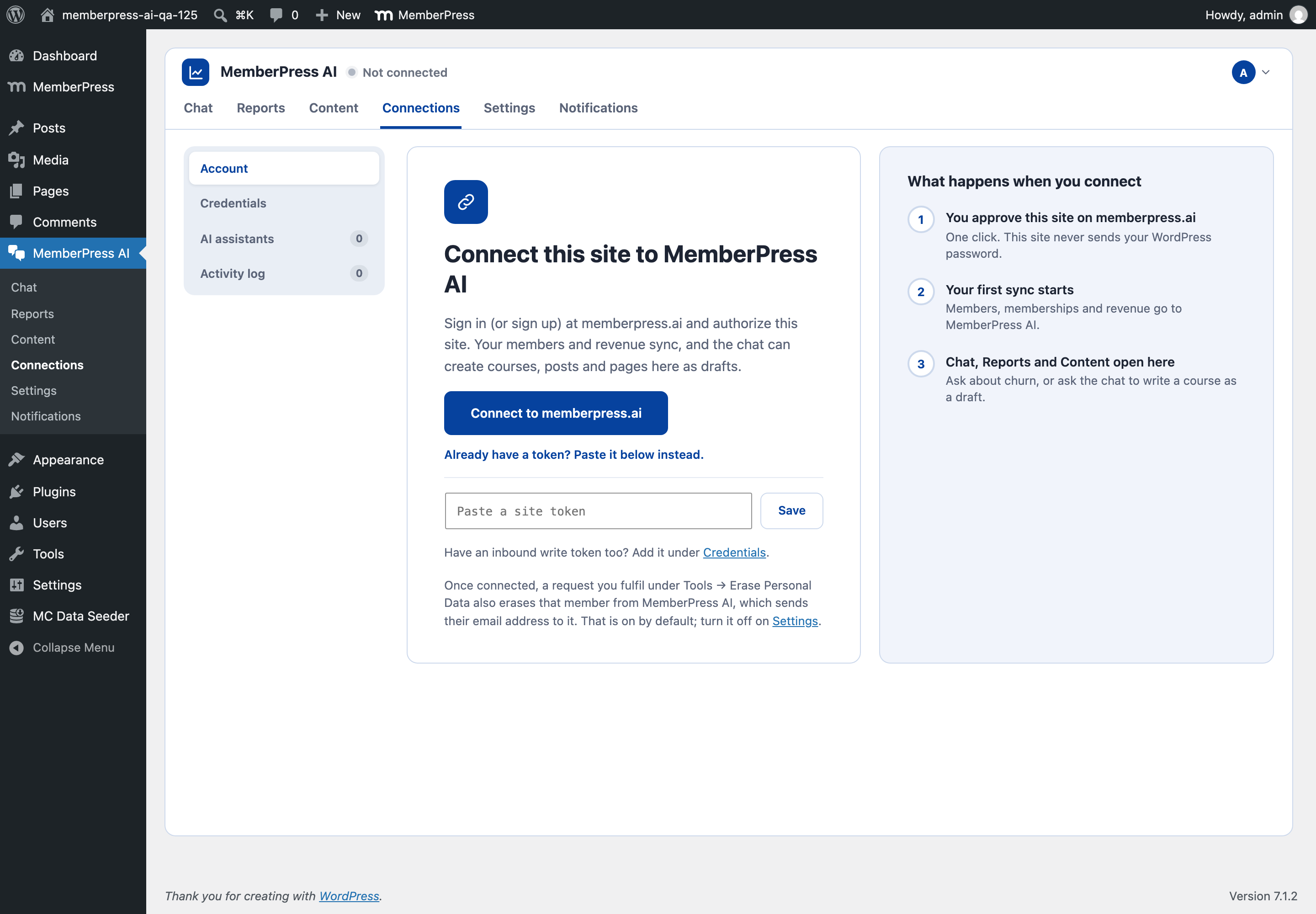
Click Connect. Open MemberPress AI > Settings > Connection and click Connect to memberpress.ai. You need to be a WordPress administrator.
-
Approve on MemberPress.ai. Your browser is sent to
app.memberpress.ai. Sign in if you aren’t already (Google sign-in works), and you land on a screen headed Connect yoursite.com to MemberPress.ai. It shows which account you’re signed in as. If this is your second or later site, it says “This is an additional site on your account”, and Connect site stays disabled until you tick I agree to the Checking price/mo additional-site charge. On the free plan it shows A second site needs Pro instead, with no Connect button. Click Connect site, or Cancel to go back with nothing changed.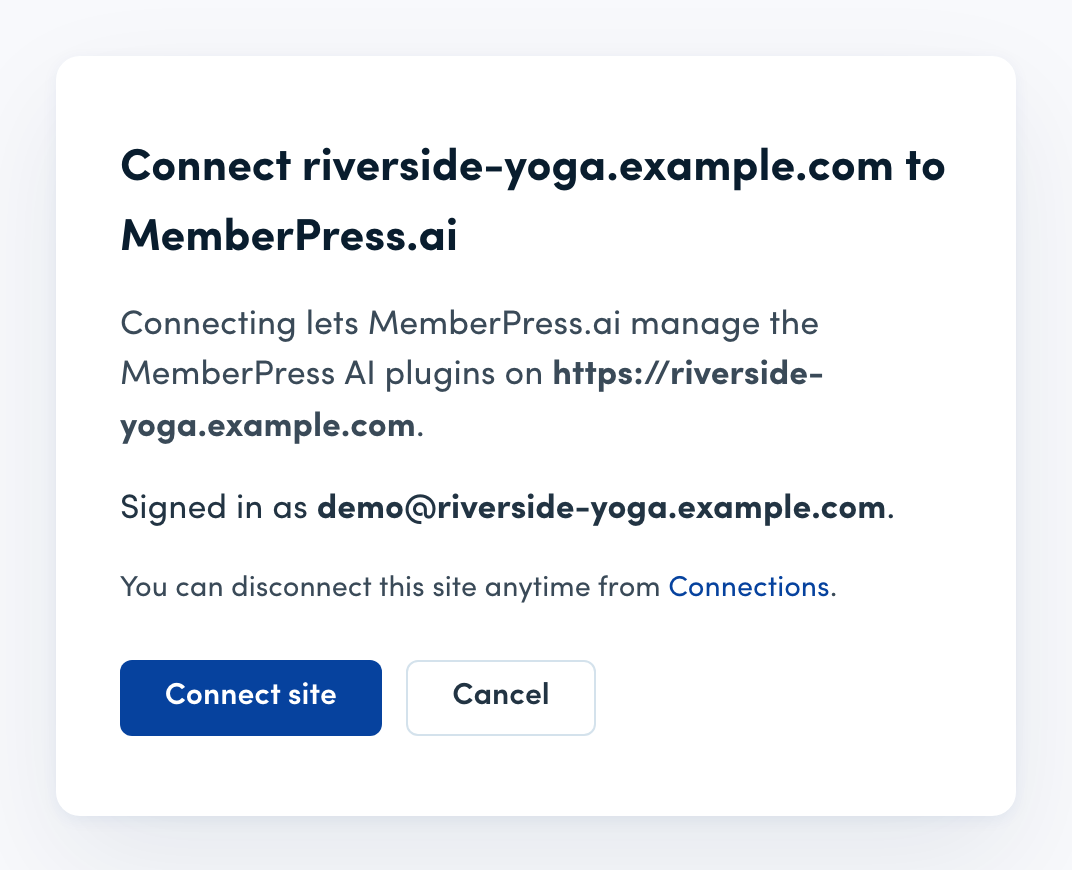
Read the Signed in as line before you approve. A site belongs to the account that approved it, so approving under the wrong one attaches your site there. Click Cancel, sign out of MemberPress.ai, and start again from wp-admin with the right account.
-
Your site receives its connection token. You’re returned to wp-admin with the notice Connected to MemberPress AI. Behind the scenes your site’s server exchanged a one-time code for a scoped connection token, over a direct server-to-server call. The token never travels through your browser, and your WordPress password never leaves your site.
-
Your first sync starts. Your members, memberships and revenue sync to MemberPress.ai. Chat, Reports and Content open in wp-admin under MemberPress AI.
-
MCP is live. Your site serves an MCP endpoint on your own domain. That’s what the hosted assistant talks to, and what you point your own AI client at if you prefer that door. You can add your own assistant under MemberPress AI > AI agents > Your assistants.
If anything along the way looks off, see Connection troubleshooting.
If you want to use MemberPress.ai from your phone after connecting, see Pocket: MemberPress.ai on your phone.
The two doors
There are two ways in, and both end at the same place:
- Hosted assistant (the flagship, touchless door). You let MemberPress.ai set the site up for you by conversation. This is the simplest path if you’d rather not touch wp-admin.
- Bring your own AI client. You connect your own Claude or ChatGPT to your site’s MCP endpoint and drive it from there. See Using your own AI client.
After you connect
Once connected, MemberPress.ai can start reading your site. You say what you want once, and Opal handles the rest. The few changes that ask for a confirmation are listed in Which changes ask you to confirm. New to the product? Start with What is MemberPress.ai?.
FAQ
Do I need to download or buy anything first?
One free download: the MemberPress AI plugin zip from the connect page. Nothing to buy, and no licence keys. The plugin needs MemberPress (free or paid) on your site and does not install it, so get MemberPress at memberpress.com/plans first if you do not have it.
Where does the approval happen?
On MemberPress.ai's app, once, on a screen that names your site and the account you're signed in as. Your WordPress password never leaves your site. Connecting your own AI client later is approved on your own WordPress login, and you can revoke it there at any time.
Does the plugin install other plugins?
No. It is the only MemberPress.ai plugin you need, but it needs MemberPress too. It does not install MemberPress for you, so if neither the free nor the paid version is on your site, get MemberPress at memberpress.com/plans first.